

In order to view images accurately on a computer, your monitor should be calibrated. Although there are no set standards for monitor calibration in the personal computer world, some simple adjustments to the brightness and contrast controls can usually improve the full tonal range and accuracy of the image.
The image below lets you check and adjust the color intensity scales for the most important colors.
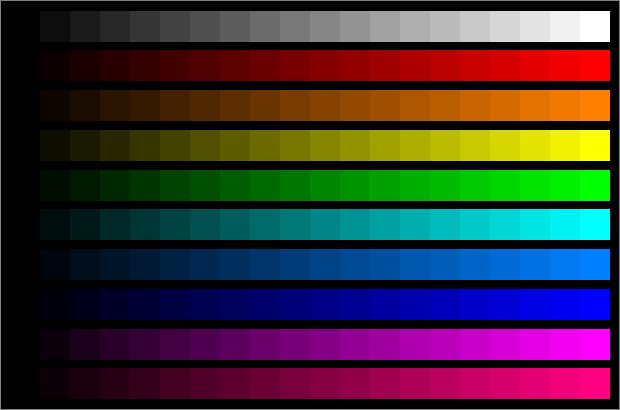
What to look for:
- The intensity of each color should increase uniformly from black to maximum brightness.
- None of the hues should change with intensity -- a color tracking error.
- All of the colors should fade uniformly to black together.
- All of the brightest steps should be distinct; otherwise, the image is saturated.
How to make adjustments:
- If you're having serious color problems, first degauss the monitor. If you have a Degauss button, simply press it; otherwise, turn the monitor off for at least 15 minutes and then turn it on again. Also, check the video cables and termination switches, if your monitor has them.
- Adjust the Brightness and Contrast controls. Adjust the Brightness control first; this affects the darker blocks. Then adjust the Contrast control, which affects the brighter blocks.
- You can change the overall color balance if the monitor has Color Temperature, White Balance, or RGB Drive controls.
- If any of the hues change with intensity, you can correct the problem if the monitor has RGB Background or Cutoff controls. If your graphics card has Gamma Correction or Transfer Function controls, they may be the source of the problem. Alternatively, you can use them to correct the problem.